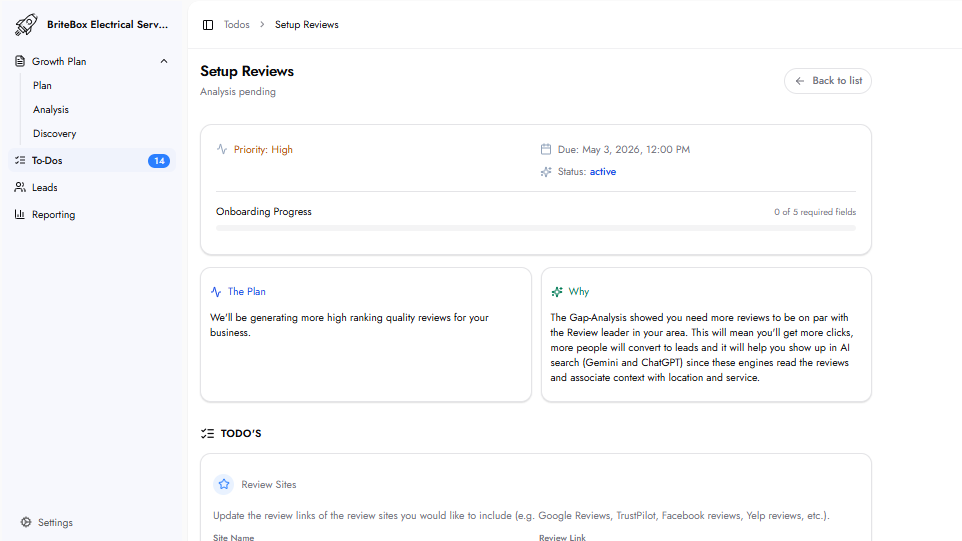
This task sets up an automated review generation system that sends review requests to customers after each completed job. The goal is to consistently build a pipeline of high-quality reviews on the platforms that matter most to your business.
Online reviews are one of the most powerful conversion signals for local service businesses. The Gap Analysis identifies how many reviews you need to reach the leader in your area and which platforms are most important for your business category. A steady, automated flow of review requests removes the need for manual follow-up and ensures every happy customer has the opportunity to share their experience.
Site Name: The name of the review platform. Google Reviews is included by default for all businesses. Additional platforms can be added depending on your industry — for example, Yelp for general local services, Zocdoc for healthcare, or Tripadvisor for travel and tourism. For most local service businesses, Google Reviews alone is sufficient.
Review Link: The direct URL customers click to leave you a review on the selected platform. This takes a customer directly to your review page so they can leave a rating with one click.
Company Logo: Upload your business logo. It appears in the review request message sent to customers, ensuring the communication looks professional and on-brand.
Complaint Handling
Complaint Email: The email address where private complaints should be directed. If a customer is not satisfied and does not want to post a public negative review, they are redirected to contact the business privately instead. This protects your public rating while giving you the opportunity to resolve the issue directly. Additional email addresses can be added so the right team members receive the complaint.
When to Send: Choose when the review request is sent: on payment (immediately when the transaction is completed) or a set number of days after. The right timing depends on your business. For businesses that complete work immediately, sending on payment makes sense. For businesses where work takes time — such as a roofer or contractor — set a delay that reflects when the job will realistically be finished. Example: a roofer who takes 30 to 45 days to complete a job would set a delay of 30 or 45 days so the customer can review the completed work, not just the purchase.
Once submitted, the review generation system is configured and begins sending automated review requests to customers at the timing you specified.
Yes. Google Reviews is included by default for all businesses because Google has the biggest impact on local visibility and search rankings. Additional platforms are optional.
The complaint handling flow intercepts unhappy customers before they post publicly. Instead of going to Google, they are directed to contact the business privately via the complaint email you provide. This gives you the opportunity to resolve the issue while protecting your public rating.
Yes. Multiple review platforms can be added depending on your industry and the platforms your customers use most.