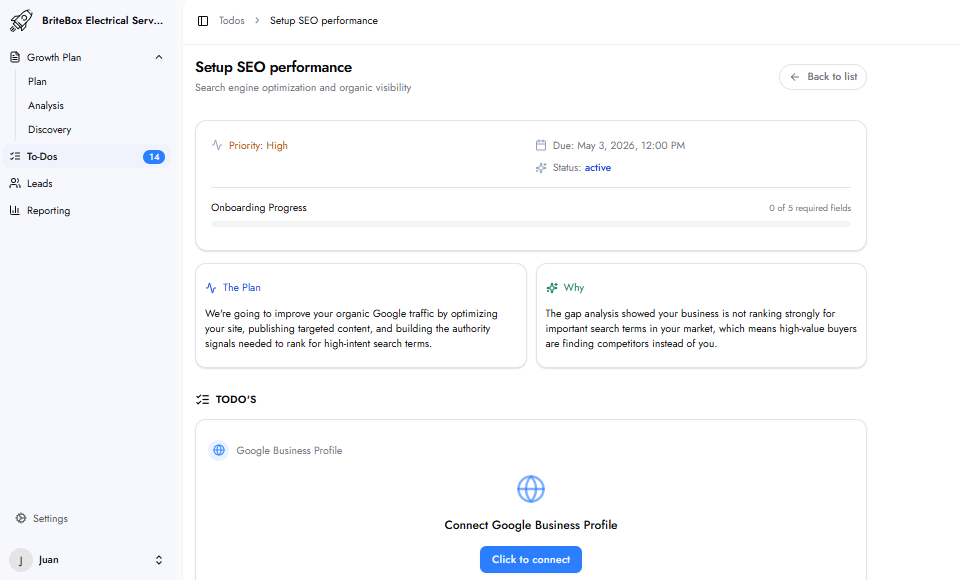
This task provides the access and permissions needed to improve your organic Google search rankings by optimizing your website, publishing targeted content, and building authority signals for high-intent search terms.
SEO Performance focuses on organic search — how your business ranks in Google search results when people search for your services. The Gap Analysis shows which keywords your business should be ranking for and how far you currently are from page one. Unlike paid ads, organic rankings generate long-term, sustainable traffic without ongoing ad spend. Every position gained translates to more high-intent visitors and more potential leads.
Connect Google Business Profile: A 'Click to connect' button that links your Google Business Profile to the system directly inside this To-Do. If you are not the manager of your Google Business Profile, invite the person who is to complete this step.
Backend Login URL: The URL of your website admin or backend login page.
Username / Email: The admin username or email for your website backend.
Password: The admin password. All credentials are encrypted at rest and used exclusively for website optimization.
Allow invisible changes?: Permission for the platform to make changes not visible to website visitors — meta tags, schema markup, title tags, and pages not in the navigation. These technical SEO changes are essential for ranking but invisible to the public. It is recommended to Allow this permission so the team can implement optimizations efficiently.
Allow visible changes without pre-approval?: Permission for the platform to directly update visible content on your website such as page copy, headings, or images. If you select Deny, the team will send all proposed visible changes to you as drafts for review before anything is published. It is recommended to Deny this and review changes before they go live.
Once submitted, the team begins optimizing your website for organic search. This includes on-site technical improvements, targeted content, and authority-building activities aligned with the keywords identified in your Gap Analysis.
Near Me SEO focuses on ranking in the Google Maps Map Pack — the top 3 local results for 'near me' and city-based searches. SEO Performance focuses on organic rankings in the main Google search results. Both serve different types of search intent and work together to maximize your overall local visibility.
Improving organic search rankings requires making changes directly to your website — updating meta tags, improving page structure, adding schema markup, and publishing new content. These changes cannot be made without backend access.
If you do not manage your Google Business Profile, invite the person who does to complete the connection step in this To-Do. They will need access to the Google account associated with the profile.